
Overview
The Post Taxes to Customer Report generates customer invoices from property tax assessments, creating detailed billing statements that can be distributed to property owners. This report is the primary mechanism for converting tax assessments into customer receivables and initiating the billing process for municipal property taxes.
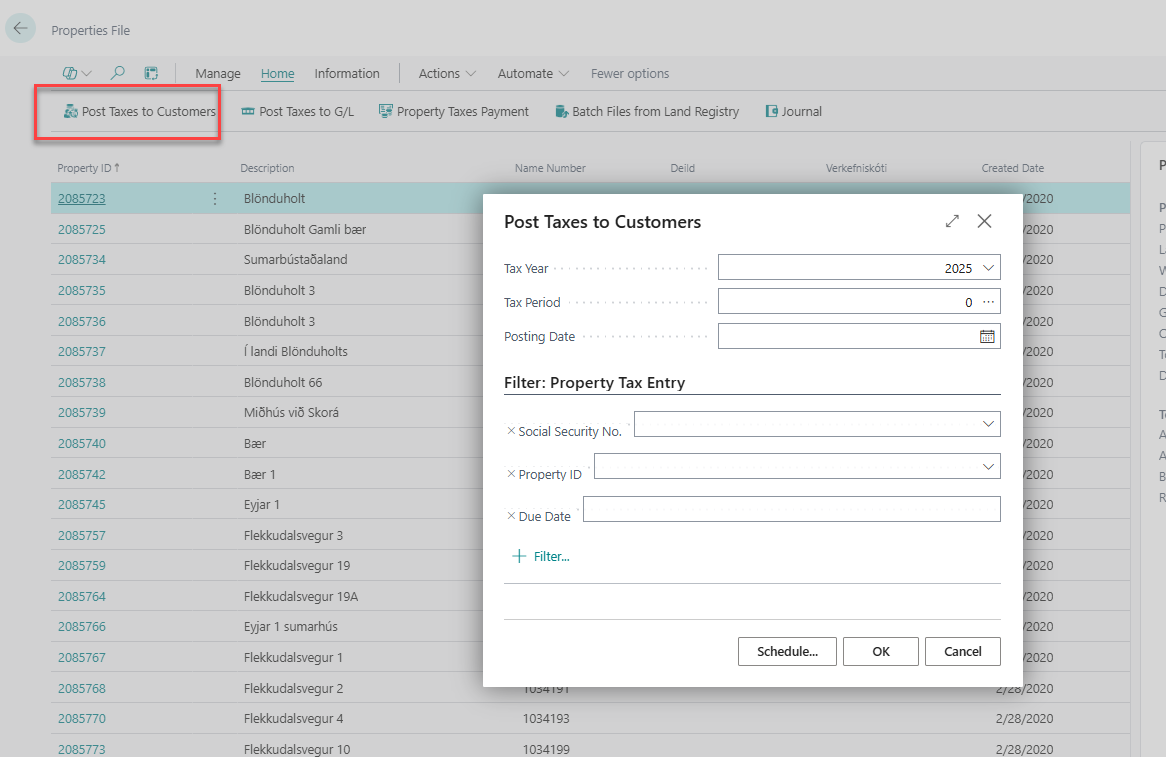
Report Parameters
Posting Date Configuration
-
Due Date: Payment deadline for tax obligations
-
Late Fee Date: Date when penalty and interest charges begin accruing
-
Tax Year: Tax year being billed to customers
Tax Types Selection
-
Property Tax: Base property tax assessments
-
Utility Assessments: Water, sewer, and garbage collection fees
-
Special Assessments: Infrastructure improvements and local improvement districts
-
Business Licenses: Commercial operation fees and permits
-
Development Charges: Building permits and connection fees
-
Penalty and Interest: Late payment charges from previous periods
Customer Filters
-
Property Owner Type: Residential, commercial, industrial, or institutional
-
Geographic Area: Neighborhoods, districts, zones, or postal codes
-
Account Status: Active, delinquent, disputed, or exempt accounts
-
Payment History: Current, past due, or payment plan customers
-
Billing Address: Filter by mailing address or service address
Best Practices
-
Run preview reports before executing final posting to catch errors early
-
Coordinate posting schedules with mail delivery and customer service capacity
-
Maintain backup procedures for invoice regeneration if needed
-
Document posting parameters and decisions for audit trail purposes
-
Monitor customer payment patterns to optimize billing cycles and collection efforts