
The Financial Reporting module in Wise Municipal Manager provides comprehensive reporting capabilities for municipalities to track financial performance, analyze budgets versus actuals, and generate regulatory-compliant financial statements.
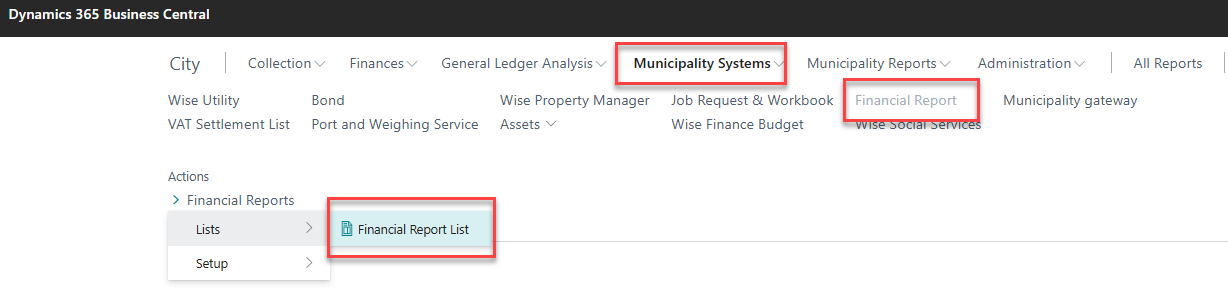
Key Features
Trial Balance Reports
-
Standard Trial Balance: Shows account balances with debit/credit columns
-
Trial Balance with Budget: Compares actual performance against budget with variance analysis
-
Trial Balance by Period: Displays comparative data across multiple periods
-
Detailed Trial Balance: Provides transaction-level detail supporting balance amounts
Budget Analysis and Reporting
-
Budget vs. Actual Reports: Comprehensive variance analysis with percentage calculations
-
Budget Export to Excel: Advanced Excel export with formulas and pivot capabilities
-
Budget Performance Analysis: Department and account-level budget tracking
-
Multi-dimensional Budget Reports: Analysis by department, project, and custom dimensions
Specialized Municipal Reports
-
Income Statement Reports: Municipal-specific income statement formatting
-
Balance Sheet Reports: Municipal balance sheet with fund accounting
-
Customer Account Analysis: Detailed aging and payment history reports
-
Vendor Analysis Reports: Vendor payment tracking and aging analysis
Report Categories
1. General Ledger Reports
Trial Balance (Standard)
Purpose: Provides a complete listing of all general ledger accounts with their debit and credit balances.
Key Features:
-
Account hierarchy with indentation
-
Debit/credit column format
-
Date range filtering
-
Dimension filtering (Department, Project)
-
Account type filtering (Posting, Heading, Total)
Usage:
-
Navigate to Reports & Analysis → Financial Reports → Trial Balance
-
Set date filter for the reporting period
-
Apply account filters if needed
-
Select dimension filters for departmental analysis
-
Choose print preview or direct print
Trial Balance with Budget Comparison
Purpose: Compares actual account balances against budgeted amounts with variance analysis.
Key Features:
-
Side-by-side actual vs. budget comparison
-
Variance percentage calculations
-
Period and cumulative budget analysis
-
Multiple budget version support
-
Exception reporting for significant variances
Budget Variance Calculations:
-
Period variance: (Actual - Budget) / Budget × 100
-
Cumulative variance: (YTD Actual - YTD Budget) / YTD Budget × 100
-
Favorable/unfavorable variance indicators
2. Budget Management Reports
Budget Export to Excel
Purpose: Exports budget data to Excel with advanced formatting and formulas for detailed analysis.
Export Features:
-
Multi-dimensional data export
-
Automatic Excel formula creation
-
Column dimension selection
-
Period-based layout (monthly, quarterly, yearly)
-
Data validation rules in Excel
Export Options:
-
Start Date: Beginning of export period
-
Number of Periods: How many periods to include
-
Period Length: Monthly (1M), Quarterly (3M), Yearly (1Y)
-
Column Dimensions: Select up to 8 dimensions for columns
-
Include Totaling Formulas: Creates Excel formulas for account totals
Excel Output Structure:
Account No. | Account Name | Dept | Project | Jan-2024 | Feb-2024 | Mar-2024
4100       | Revenues     | ADM  | PROJ1   | 50,000   | 55,000   | 52,000
4200       | Fees         | ADM  | PROJ1   | 10,000   | 12,000   | 11,000
3. Customer Financial Analysis
Customer Detailed Aging Report
Purpose: Provides detailed aging analysis of customer receivables with payment history.
Features:
-
Age brackets: Current, 30, 60, 90, 120+ days
-
Customer payment history
-
Credit limit monitoring
-
Collection priority indicators
-
Business account classification
Customer Trial Balance by Business Account
Purpose: Analyzes customer balances grouped by municipal business account types.
Business Account Categories:
-
Property Taxes: Real estate tax receivables
-
Utilities: Water, sewer, garbage collection
-
Permits & Licenses: Building permits, business licenses
-
Fines & Penalties: Traffic fines, code violations
-
Fees for Service: Recreation fees, facility rentals
4. Vendor Financial Analysis
Vendor Detailed Trial Balance
Purpose: Tracks vendor balances and payment obligations with aging analysis.
Features:
-
Vendor payment terms tracking
-
Early payment discount opportunities
-
Cash flow planning support
-
Expense category analysis
-
Purchase order matching status
5. Fixed Asset Reporting
Fixed Asset Account Balance Export
Purpose: Provides detailed fixed asset reporting with depreciation tracking.
Features:
-
Asset category analysis (Buildings, Infrastructure, Equipment)
-
Depreciation method tracking
-
Net book value calculations
-
Asset retirement tracking
-
Insurance value reporting
6. Specialized Financial Reports
General Journal Test Reports
Purpose: Validates journal entries before posting with error detection.
Validation Checks:
-
Account balance validation
-
Dimension consistency checks
-
Required field validation
-
Duplicate entry detection
-
Posting date validation
VAT Entry Balance by Posting Group
Purpose: Analyzes VAT transactions by posting group for tax reporting.
Features:
-
VAT rate analysis
-
Input vs. output VAT comparison
-
Posting group classification
-
Tax period reconciliation
-
RSK (Tax Authority) reporting format
Advanced Reporting Features
Multi-Dimensional Analysis
All financial reports support analysis across multiple dimensions:
-
Department Dimension: Analyze by organizational department
-
Project Dimension: Track project-specific financial performance
-
Business Account: Categorize by revenue/expense type
-
Location: Geographic or facility-based analysis
-
Custom Dimensions: User-defined analysis categories
Period Comparison Features
-
Period-over-Period: Compare current vs. previous period
-
Year-over-Year: Annual comparative analysis
-
Budget Variance: Actual vs. budget comparison
-
Cumulative Analysis: Year-to-date vs. prior year-to-date
Export and Integration Options
Excel Integration
-
Direct Export: One-click export to Excel with formatting
-
Template-Based: Use predefined Excel templates
-
Formula Preservation: Maintain Excel formulas in exports
-
Pivot Table Ready: Data formatted for pivot table analysis
Power BI Integration
-
Real-time Data: Live connection to Business Central data
-
Dashboard Creation: Build interactive financial dashboards
-
KPI Monitoring: Track key financial performance indicators
-
Automated Refresh: Scheduled data updates
Report Scheduling and Automation
Automated Report Generation
-
Scheduled Reports: Set up recurring report generation
-
Email Distribution: Automatic email delivery to stakeholders
-
File Location: Save to shared network locations
-
Format Options: PDF, Excel, Word formats available
Report Security and Access Control
-
User Permissions: Control access to sensitive financial reports
-
Data Filtering: Restrict data visibility by user role
-
Audit Trail: Track report generation and access
-
Approval Workflows: Require approval for certain reports
Integration with External Systems
Tax Authority (RSK) Integration
-
Automated VAT Returns: Generate RSK-compliant VAT reports
-
Electronic Submission: Direct submission to tax authorities
-
Validation Rules: Ensure compliance with Icelandic tax regulations
-
Error Checking: Validate data before submission
Audit Support Features
-
Audit Trail Reports: Complete transaction history
-
Supporting Documentation: Link to source documents
-
Account Analysis: Detailed account activity reports
-
Balance Reconciliation: Month-end closing reports
Common Troubleshooting
Report Performance Issues
Problem: Reports run slowly or time out
Solutions:
-
Reduce date ranges for large datasets
-
Use account filters to limit scope
-
Run reports during off-peak hours
-
Consider using cached data for historical reports
Data Accuracy Issues
Problem: Report totals don't match expected amounts
Solutions:
-
Verify posting date filters are correct
-
Check for unposted journal entries
-
Ensure all dimensions are included in filters
-
Validate account mapping and setup
Export Problems
Problem: Excel exports fail or contain errors
Solutions:
-
Check Excel application availability
-
Verify file permissions on export location
-
Reduce data size by filtering
-
Update Excel application if needed
Budget Variance Analysis Issues
Problem: Budget variances appear incorrect
Solutions:
-
Verify budget name and version selection
-
Check budget period alignment with actual data
-
Ensure consistent dimension usage in budget vs. actual
-
Validate budget entry completeness
Best Practices
Report Design
-
Consistent Formatting: Use standard layouts across similar reports
-
Clear Titles: Include period, filters, and report purpose
-
Meaningful Subtotals: Group related accounts logically
-
Exception Highlighting: Emphasize unusual or significant items
Data Validation
-
Regular Reconciliation: Compare report totals to general ledger
-
Cross-Report Validation: Verify consistency across related reports
-
Source Document Tracing: Maintain ability to trace to original transactions
-
Monthly Closing: Ensure complete and accurate month-end closing
Performance Optimization
-
Indexed Fields: Use indexed fields in report filters
-
Appropriate Filters: Apply filters to reduce dataset size
-
Scheduled Generation: Run large reports during off-peak hours
-
Data Archiving: Archive old data to improve performance
Key Benefits
-
Comprehensive Analysis: Complete financial reporting suite for municipalities
-
Regulatory Compliance: Meets Icelandic municipal accounting standards
-
Budget Management: Advanced budgeting and variance analysis tools
-
Multi-dimensional: Flexible reporting across departments and projects
-
Excel Integration: Seamless export for advanced analysis
-
Automated Processing: Scheduled reports and email distribution
-
Audit Support: Complete audit trails and supporting documentation
-
Performance Monitoring: KPI tracking and dashboard integration
The Financial Reporting module provides municipalities with the tools needed for comprehensive financial analysis, regulatory compliance, and strategic decision-making support.