
The system uses a hierarchical structure where Field Classes group related departments together, providing a logical organizational framework for financial management.
Understanding the Hierarchy
-
Field Classes: High-level categories (e.g., Administration, Operations, Public Services)
-
Departments: Specific organizational units within field classes (e.g., HR, Finance, IT)
Setting Up Field Classes
Field Classes are the top-level organizational categories that group related departments.
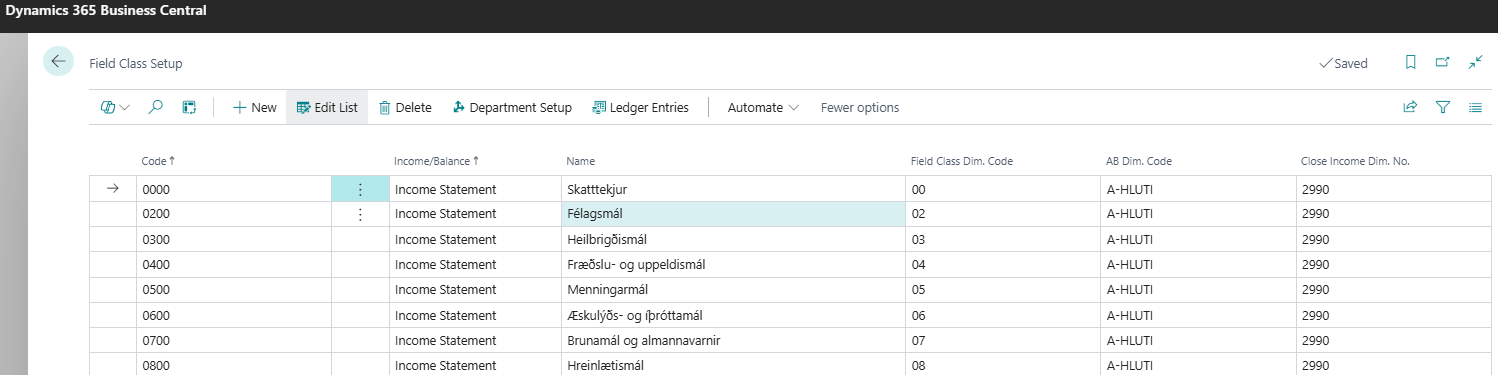
Creating a Field Class
-
Navigate to Field Class Setup
-
Go to Field Class Setup page
-
Click New
-
-
Enter Field Class Information
-
Code: Unique identifier (e.g., "ADMIN", "OPS")
-
Income/Balance: Select either "Income Statement" or "Balance Sheet"
-
Name: Descriptive name (e.g., "Administration", "Operations")
-
Field Class Dim. Code: Associated dimension value for SERVICE dimension
-
AB Dim. Code: Associated AB dimension value (if applicable)
-
Close Income Dim. No.: Department used for year-end closing procedures
-
Field Class Properties
-
Type: Automatically set to "Field Class"
-
Income/Balance Classification: Determines reporting category
-
Dimension Relationships: Links to various dimension codes
-
Closing Configuration: For year-end procedures
Setting Up Departments
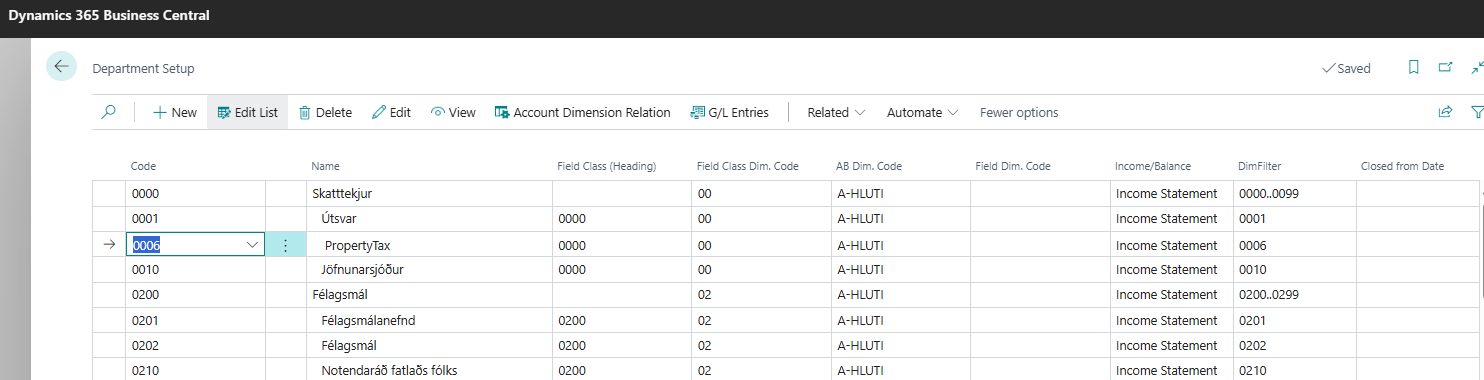
Departments are the operational units that belong to field classes and perform the actual work.
Creating a Department
-
Navigate to Department Setup
-
Go to Department Setup page
-
Click New
-
-
Fill Required Fields
-
Code: Unique department identifier (e.g., "ADMIN01", "IT01")
-
Name: Department name (e.g., "Human Resources", "Information Technology")
-
Field Class (Heading): Select the parent field class from dropdown
-
Income/Balance: Automatically inherited from field class
-
Type: Set to "Department"
-
Closed From Date: Leave blank unless department is being closed
-
-
Configure Dimension Codes
-
Field Class Dim. Code: Automatically filled from parent field class
-
AB Dim. Code: Automatically filled from parent field class
-
Field Dim. Code: Issue classification code (set manually if needed)
-
DimFilter - Automatically generated filter string
-
Close Income Dim. No. - For year-end closing procedures
-
Department Properties
-
Hierarchical Structure: Departments appear indented under their field class
-
Automatic Inheritance: Key properties inherited from parent field class
-
Filter Generation: System automatically creates DimFilter for reporting
-
Dimension Synchronization: Changes sync with Business Central dimension values
Using the Department Card
For detailed configuration, access the Department Card:
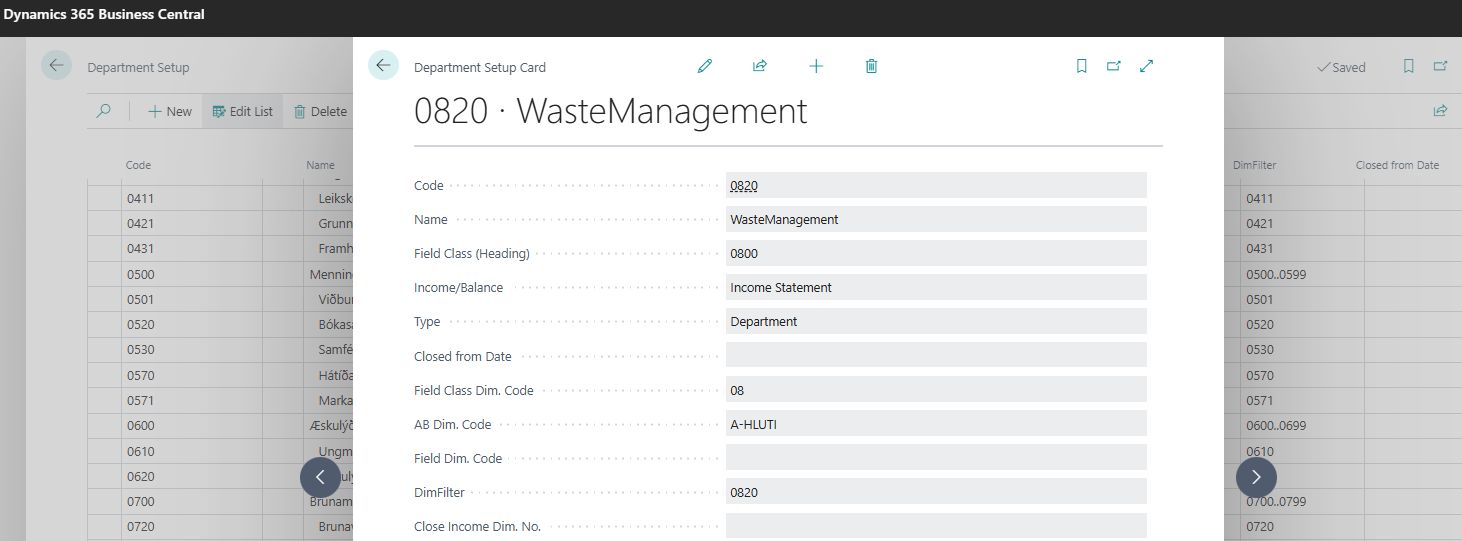
Available Fields
-
Code and Name: Basic identification
-
Field Class (Heading): Parent field class assignment
-
Income/Balance: Classification for reporting
-
Type: Department or Field Class designation
-
Closed From Date: For department closure management
-
Dimension Codes: All related dimension assignments
-
DimFilter: Automatically generated filter string
-
Close Income Dim. No.: For year-end closing procedures
Navigation Options
-
Account Dimension Relation: Define allowed account-department combinations
-
Field Class VAT Setup: Configure VAT by department
-
Automatic Transfer: Set up automated transfers
-
G/L Entries: View all general ledger entries for the department
Dimension Synchronization
The system maintains automatic synchronization between departments and Business Central dimensions:
Automatic Processes
-
Insert: Creating a department automatically creates corresponding dimension value
-
Modify: Changes to department sync to dimension value
-
Delete: Removing department deletes corresponding dimension value
Dimension Value Properties
-
Field Classes: Created as "Begin-Total" type with no indentation
-
Departments: Created as "Standard" type with 1-level indentation
-
Income/Balance: Synchronized with department classification
Best Practices
Naming Conventions
-
Use consistent prefixes for field classes (e.g., "ADM", "OPS", "SVC")
-
Include sequential numbers for departments (e.g., "ADM01", "ADM02")
-
Keep names descriptive but concise
Organizational Structure
-
Limit field classes to 5-10 main categories
-
Group related departments logically
-
Consider reporting needs when structuring
Maintenance
-
Review structure annually during budget planning
-
Archive closed departments rather than deleting
-
Document any structural changes